YMU: YimMenu. Simple. Up-To-Date.
The smart launcher for YimMenu, featuring automatic update checks, streamlined integration, and seamless Lua script management—all in one place.
Download YMU v1.1.6Key Features
Everything you need for YimMenu, in one utility.
Always Up-to-Date
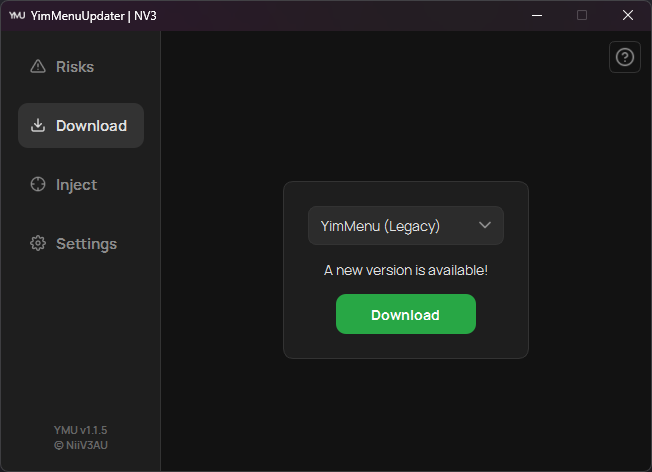
YMU automatically validates the latest YimMenu releases and notifies you. Update to the current stable version with ease.
Seamless Integration
Forget separate loaders. Launch GTA V and integrate YimMenu directly from the YMU interface.
Lua Script Management
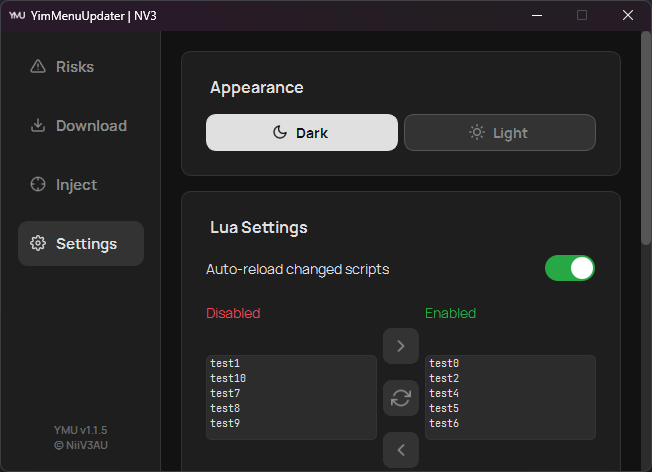
Seamlessly manage your Lua scripts. Discover new extensions, and toggle them on or off directly within the app.
Modern UI
A clean and intuitive user interface, built with PySide6, featuring both Light and Dark themes.
Integrated Help
Need assistance? Integrated buttons on every tab guide you to maximize your YMU experience.
Self-Updater
Keep YMU current with the built-in self-updater for the latest features and performance improvements.
Look & Feel
Modern, clean, and customizable.
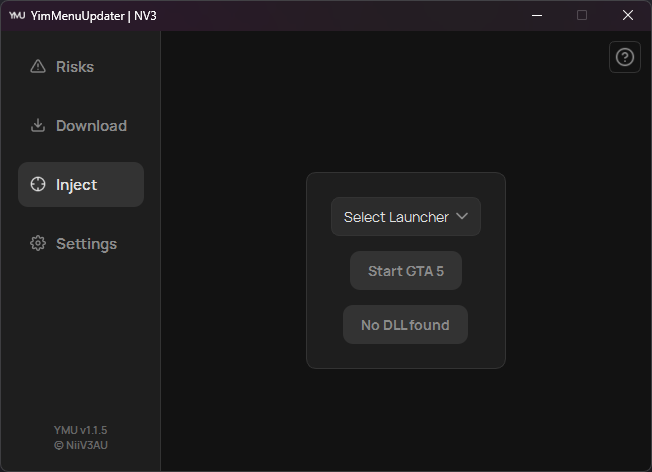
How It Works
Get started in just a few steps.
Download & Run
Download ymu.exe and execute the application.
YimMenu Download
Use the 'Download' tab to acquire the latest version of YimMenu.
Launch & Load
Navigate to the 'Launch' tab. You can start GTA V directly from YMU (optional), then simply click to load YimMenu.
For more detailed guidance, click the integrated help buttons within the YMU application.
Download
Looking for Lua Scripts?
Browse official community scripts.
Latest Updates
Added full support for GTA V Enhanced Edition, support for 12 languages, and migrated to Nuitka for a significantly smaller and faster executable.
Complete UI Overhaul and Code Refactoring (CustomTkinter -> PySide6). GTA 5 Enhanced is now supported thanks to YimMenuV2.
Added Buttons (YimMenu GitHub Repo & FSL) in Download Tab + updated "more info"-windows in various tabs.
New Lua list in Settings-Tab - activate/deactivate scripts & discover more extensions.
Fixed progressbar freezing.
Frequently Asked Questions (FAQ)
The easiest method is via YMU. Navigate to the 'Download' tab in the app and select the update option. YMU manages the process, automatically retrieving and installing the latest compatible version of YimMenu.
Once the desired YimMenu Version (Legacy or Enhanced) is acquired via YMU, navigate to the 'Launch' tab. Start GTA V and execute the selected YimMenu-Variation with one click. No external loader is required.
The link in our download section directs you to the official YimMenu-Lua GitHub organization, a verified source for extensions. You can also manage your installed scripts directly from the settings tab within YMU.
YMU is source-available and maintains a clean codebase.
However, utilizing third-party software modifications always involves technical considerations.
Please review the 'Risks' tab within the YMU software.
Navigating the ecosystem of community tools can be complex. Downloads from unverified sources like forums or clone websites may contain compromised or outdated files. YMU eliminates this variable. We ensure integrity by exclusively fetching the 'YimMenu.dll' from the official YimMenu GitHub repositories. With YMU, you receive the authentic, unaltered file for a stable experience. Links to these repositories are available in the footer.
No, YMU is designed as a comprehensive solution. It includes a reliable, built-in loading mechanism, removing the need to use separate third-party tools. After YMU retrieves the latest 'YimMenu.dll', you can launch GTA V and load the interface with a single interaction. This streamlines the workflow from update to execution.
Please refer to the Building from Source section in our GitHub README for all dependencies and build instructions.
Join the Community
Have an idea, a feature request, or found an issue? Join the conversation!
Show your support and help the project grow:
Star us on GitHubAbout the Project
"What began as a small script has grown into a robust utility for over a thousand users. YMU is designed to streamline essential tasks: updating YimMenu, safely executing the dynamic link library (dll), and easily enabling or disabling Lua scripts. YMU focuses on reliability and user experience, driven by the active involvement of its community."- NiiV3AU