YMU: YimMenu. Simple. Up-to-Date.
The smart launcher for YimMenu, featuring automatic update checks, streamlined integration, and seamless Lua script management—all in one place.
Scroll to YMU DownloadKey Features
Everything you need for YimMenu, in one utility.
Always Up-to-Date
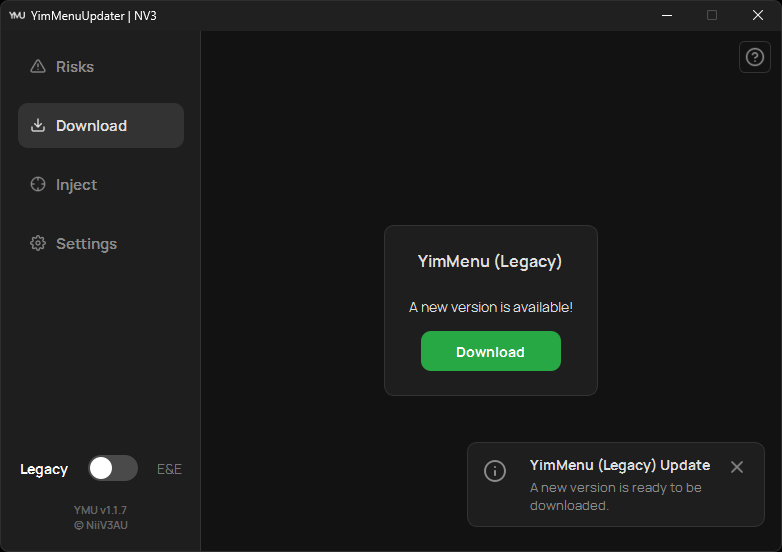
YMU automatically checks for the latest YimMenu releases and notifies you. Update to the current stable version with ease.
Seamless Integration
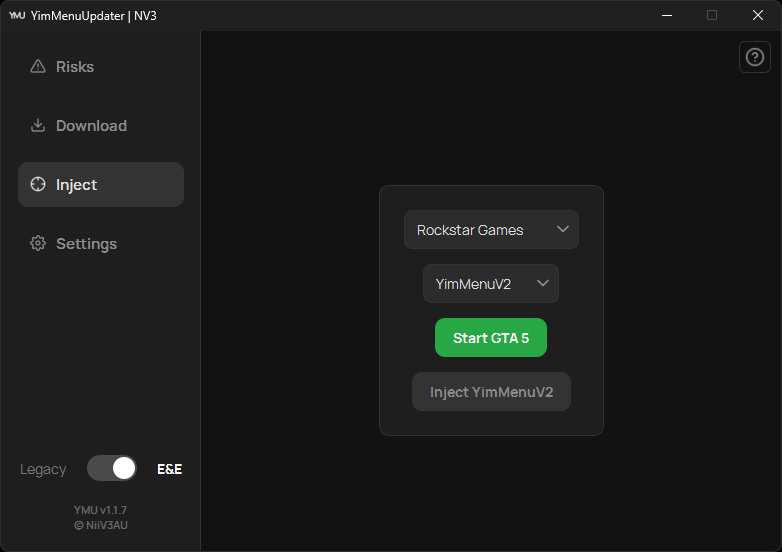
Forget separate loaders. Launch GTA V and integrate YimMenu directly from the YMU interface.
Lua Script Management
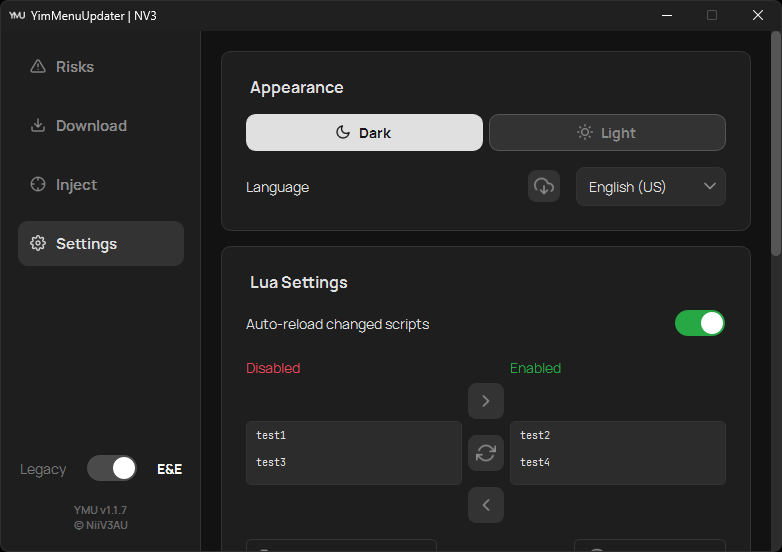
Seamlessly manage your Lua scripts. Discover new extensions, and toggle them on or off directly within the app.
Modern UI
A clean and intuitive user interface, built with PySide6, featuring both Light and Dark themes.
Integrated Help
Need assistance? Integrated buttons on every tab guide you to maximize your YMU experience.
Update Notifications
Check for YMU updates right inside the app. One click tells you whether you're running the latest version.
Look & Feel
Modern, clean, and customizable.
How It Works
Get started in just a few steps.
Download & Run
Download ymu.exe and run it.
YimMenu Download
Use the 'Download' tab to download the latest version of YimMenu.
Start & Inject
Navigate to the 'Inject' tab. You can start GTA V directly from YMU (optional), then simply click to inject YimMenu.
For more detailed guidance, click the integrated help buttons within the YMU application.
Download
Prebuilt Executable
Source
Looking for Lua Scripts?
Browse official community scripts.
Latest Updates
v1.1.11 - Systems Engineering, Antivirus Hardening & UX Polish Sep 07, 2026
Eliminates antivirus false positives via native Win32 process enumeration, hardens handle lifecycles and UAC operations, migrates DLL storage to %LOCALAPPDATA%, adds a dedicated maintenance suite (cache cleaner, bulk Lua toggling, FSL detection), handles locked DLL files gracefully, and introduces refreshed Lucide icons with comprehensive UI/UX refinements.
v1.1.10 - In-App Restart Hotfix Sep 03, 2026
Targeted hotfix resolving an issue where restarting YMU from within the application caused SSL and network connection failures.
v1.1.9 - Quality of Life & Precision Sep 03, 2026
Real-time in-memory module verification, auto-close after successful injection, audio feedback chimes, one-click -nobattleye commandline helper, full keyboard navigation & focus overhaul, and hardened notification lifecycle.
v1.1.8 - Reliability & Clarity Jul 21, 2026
Fixes injection failing when your install path contains accented or non-ASCII characters (e.g. "Müller" or a Cyrillic user name), plus plain-language injection errors with one-click fixes, a non-blocking BattlEye warning, a pre-injection DLL check, and a Start button that recovers when a launch never completes.
v1.1.7 - Compatibility, Customizability & Bugfixes Jul 08, 2026
GTA V Enhanced is reliably detected again and launches through YMU, complemented by a Legacy/Enhanced switch, custom install paths, custom DLL injection, remembered selections, and a refreshed light theme.
v1.1.6 - Localization, Performance & Bugfixes Dec 17, 2025
Added full support for GTA V Enhanced Edition, support for 12 languages, and migrated to Nuitka for a significantly smaller and faster executable.
v1.1.5 - The Modern UI Update Aug 31, 2025
Complete rewrite from the ground up with a modern PySide6 architecture, brand-new user interface, non-blocking notifications, and initial GTA V Enhanced Edition support.
Frequently Asked Questions (FAQ)
How do I update YimMenu?
The easiest method is via YMU. Navigate to the 'Download' tab in the app and select the update option. YMU manages the process, automatically retrieving and installing the latest compatible version of YimMenu.
How do I inject YimMenu?
Once you've downloaded the YimMenu version you want (Legacy or Enhanced), navigate to the 'Inject' tab. Start GTA V and inject the selected edition with one click. No external loader required.
Where can I find Lua scripts for YimMenu?
The link in our download section directs you to the official YimMenu-Lua GitHub organization, a verified source for extensions. You can also manage your installed scripts directly from the settings tab within YMU.
Is YMU secure?
YMU is source-available and maintains a clean codebase.
That said, using any third-party game modification — YimMenu included — carries an inherent risk of a game ban if used online.
Please review the 'Risks' tab within the YMU software.
Why use YMU instead of other sources?
The world of community mod tools isn't always trustworthy. Downloads from unverified sources like forums or clone websites may contain compromised or outdated files. YMU takes that risk off the table: we ensure integrity by exclusively fetching the 'YimMenu.dll' from the official YimMenu GitHub repositories. With YMU, you receive the authentic, unaltered file for a stable experience. Links to these repositories are available in the footer.
Do I need a separate external loader?
No, YMU handles the whole thing. It has a reliable, built-in loading mechanism, so you never need separate third-party tools. After YMU retrieves the latest 'YimMenu.dll', you can start GTA V and inject it with one click.
How do I build YMU from source?
Please refer to the Building from Source section in our GitHub README for all dependencies and build instructions.
Join the Community
Got an idea, a feature request, or found a bug? Join the conversation!
Show your support and help the project grow:
Star us on GitHubAbout the Project
"What began as a small script has grown into a robust utility for over a thousand users. YMU is designed to streamline essential tasks: updating YimMenu, safely loading the dynamic link library (dll), and easily enabling or disabling Lua scripts. YMU focuses on reliability and user experience, driven by the active involvement of its community."- NiiV3AU