核心功能
YimMenu 所需的一切,盡在此工具中。
始終保持最新
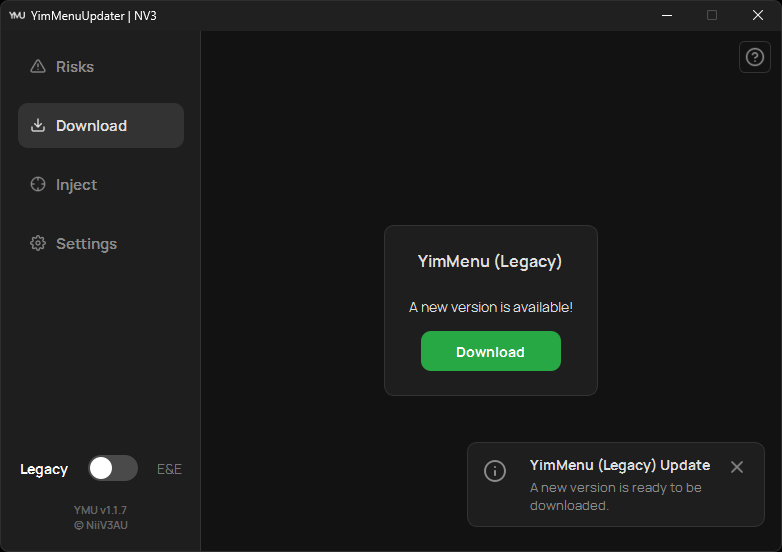
YMU 自動驗證 YimMenu 的最新發布並通知你。輕鬆更新至最新的穩定版本。
無縫整合
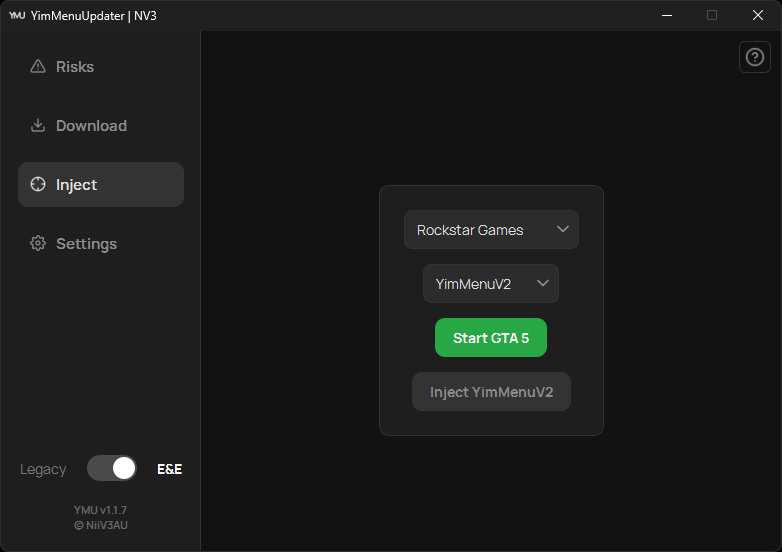
告別繁瑣的載入器。通過 YMU 介面直接啟動 GTA V 並整合 YimMenu。
Lua 腳本管理
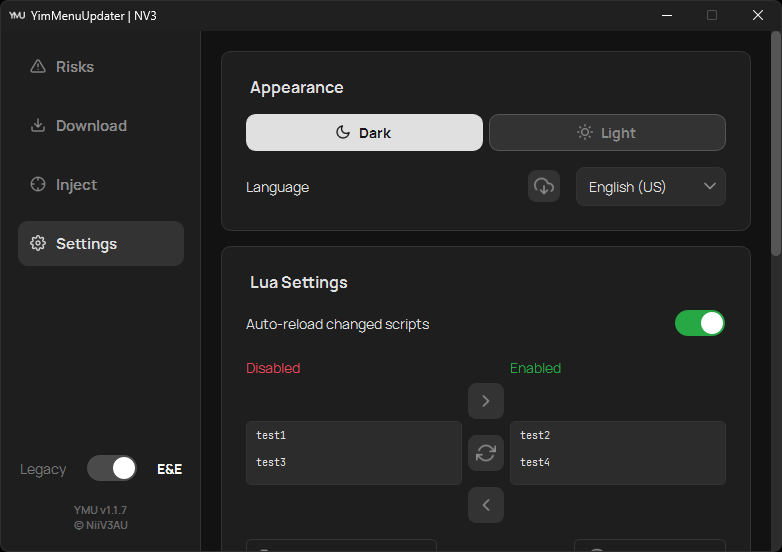
無縫管理 Lua 腳本。發現新擴展,並在應用內直接啟用或禁用。
現代 UI
基於 PySide6 構建的簡潔直觀用戶介面,支持淺色和深色主題。
內建幫助
需要幫助?每個標籤頁上的內建 按鈕將指導你充分利用 YMU。
更新提醒
在應用內直接檢查 YMU 更新。一鍵即可知道你是否使用的是最新版本。
外觀與體驗
現代、簡潔且可定製。
使用方法
只需幾步即可開始。
下載並運行
下載 ymu.exe 並運行應用程式。
YimMenu Download
使用“下載”標籤頁獲取 YimMenu 的最新版本。
啟動並注入
前往“注入”標籤頁。你可以直接通過 YMU 啟動 GTA V(可選),然後點擊注入 YimMenu。
如需更詳細的指導,請點擊 YMU 應用程式內的整合 幫助按鈕。
下載
源碼
正在尋找 Lua 腳本?
瀏覽官方社區腳本。
最新更新
v1.1.11 - Systems Engineering, Antivirus Hardening & UX Polish Sep 07, 2026
Eliminates antivirus false positives via native Win32 process enumeration, hardens handle lifecycles and UAC operations, migrates DLL storage to %LOCALAPPDATA%, adds a dedicated maintenance suite (cache cleaner, bulk Lua toggling, FSL detection), handles locked DLL files gracefully, and introduces refreshed Lucide icons with comprehensive UI/UX refinements.
v1.1.10 - In-App Restart Hotfix Sep 03, 2026
Targeted hotfix resolving an issue where restarting YMU from within the application caused SSL and network connection failures.
v1.1.9 - Quality of Life & Precision Sep 03, 2026
Real-time in-memory module verification, auto-close after successful injection, audio feedback chimes, one-click -nobattleye commandline helper, full keyboard navigation & focus overhaul, and hardened notification lifecycle.
v1.1.8 - Reliability & Clarity Jul 21, 2026
Fixes injection failing when your install path contains accented or non-ASCII characters (e.g. "Müller" or a Cyrillic user name), plus plain-language injection errors with one-click fixes, a non-blocking BattlEye warning, a pre-injection DLL check, and a Start button that recovers when a launch never completes.
v1.1.7 - Compatibility, Customizability & Bugfixes Jul 08, 2026
GTA V Enhanced is reliably detected again and launches through YMU, complemented by a Legacy/Enhanced switch, custom install paths, custom DLL injection, remembered selections, and a refreshed light theme.
v1.1.6 - Localization, Performance & Bugfixes Dec 17, 2025
Added full support for GTA V Enhanced Edition, support for 12 languages, and migrated to Nuitka for a significantly smaller and faster executable.
v1.1.5 - The Modern UI Update Aug 31, 2025
Complete rewrite from the ground up with a modern PySide6 architecture, brand-new user interface, non-blocking notifications, and initial GTA V Enhanced Edition support.
常見問題 (FAQ)
如何更新 YimMenu?
通過 YMU 最為簡單。在應用中前往“下載”標籤頁並選擇更新選項。YMU 會自動管理該過程,獲取並安裝最新的相容版本。
如何注入 YimMenu?
通過 YMU 獲取所需的 YimMenu 版本(Legacy 或 Enhanced)後,前往“注入”標籤頁。啟動 GTA V 並一鍵注入選定的 YimMenu 版本。無需外部載入器。
哪裏可以找到 YimMenu 的 Lua 腳本?
我們下載部分的連結將指向官方 YimMenu-Lua GitHub 組織,這是經過驗證的擴展來源。你也可以直接在 YMU 的設定標籤頁中管理已安裝的腳本。
YMU 安全嗎?
YMU 是源碼可見的,並保持代碼庫整潔。
然而,使用第三方軟體修改總是涉及技術考慮。
請查看 YMU 軟體內的“風險提示”標籤頁。
為什麼使用 YMU 而非其他來源?
社區工具生態系統可能很複雜。來自論壇或克隆網站等未驗證來源的下載可能包含受損或過期的檔案。YMU 消除了這一變數。我們確保僅從官方 YimMenu GitHub 儲存庫獲取 'YimMenu.dll',以保證完整性。使用 YMU,你將獲得真實、未修改的檔案,確保穩定的體驗。這些儲存庫的連結可在頁腳找到。
我需要單獨的外部載入器嗎?
不需要,YMU 設計為綜合解決方案。它包含可靠的內建載入機制,無需使用單獨的第三方工具。YMU 獲取最新的 'YimMenu.dll' 後,你可以啟動 GTA V 並通過一次交互注入介面。這簡化了從更新到執行的工作流程。
如何從源碼構建 YMU?
請參考我們 GitHub README 中的 從源碼構建 部分,瞭解所有依賴項和構建說明。
關於專案
"起初只是一個小腳本,現已成長為擁有千餘名用戶的強大工具。YMU 旨在簡化核心任務:更新 YimMenu、安全執行動態連結庫 (dll) 以及輕鬆啟用或禁用 Lua 腳本。YMU 專注於可靠性和用戶體驗,並由社區的積極參與推動。"- NiiV3AU